
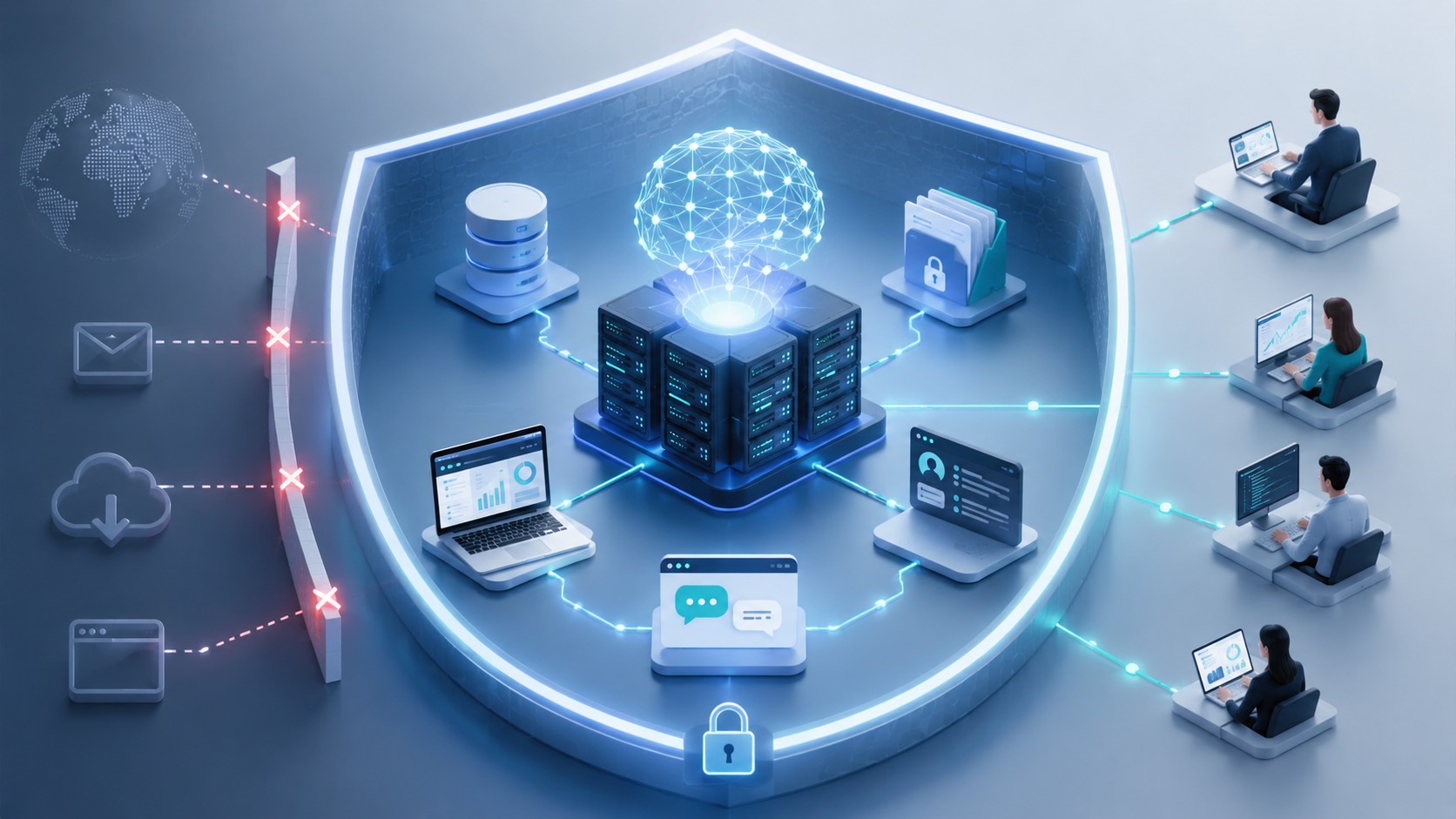
How to Build an Enclosed Internal AI Infrastructure That Prevents Uncontrolled Data Flows
Generative AI helps companies search internal knowledge, summarize documents, extract information, draft business content, and support employees in complex workflows. Today, it is common to use public AI models such as ChatGPT, Claude or Gemini. However, using those public AI tools for these tasks creates an obvious problem – unveiling sensitive data: employees often submit contracts, technical documentation, customer information, source code, or other confidential data to systems outside the company’s direct control.
Simply prohibiting external AI tools is rarely an effective long-term strategy. Employees use them because they provide real productivity benefits. A more sustainable approach is to offer an approved internal alternative: an enclosed AI infrastructure in which models, documents, permissions, and data flows remain under company control.
Such an environment is more than a locally installed language model. It is a complete technical architecture that controls who can use the AI, which information it can access, where processing takes place, which external connections are permitted, and how every relevant action is monitored.
The central principle is simple: company data should not leave the defined infrastructure boundary unless an approved process explicitly allows it.
What Is an Enclosed Internal AI Infrastructure?
An enclosed internal AI infrastructure is a company-controlled environment for running AI models and connecting them to internal information.
Depending on the organization’s requirements, the environment may operate:
- entirely on company-owned servers;
- in a dedicated private cloud environment;
- in an isolated data center;
- or as a controlled hybrid architecture.
The word “enclosed” does not necessarily mean that the system must be permanently disconnected from the internet. It means that data cannot flow freely to external services. Every permitted connection should have a defined purpose, destination, authorization rule, and monitoring mechanism.
Uncontrolled data flow can include more than the text entered into an AI chat. Potentially sensitive information may also leave through uploaded documents, generated embeddings, application logs, diagnostic telemetry, API calls, automated backups, software update services, or connected plugins.
A secure architecture must therefore control the complete data path, not just the model endpoint.
An Enclosed AI Environment Is Built in Layers
An enclosed internal AI infrastructure is not a single standardized product. It is a combination of technical components and security controls that can be implemented at different levels.
The following overview illustrates the different layers and manifold extensions an internal AI environment can have:
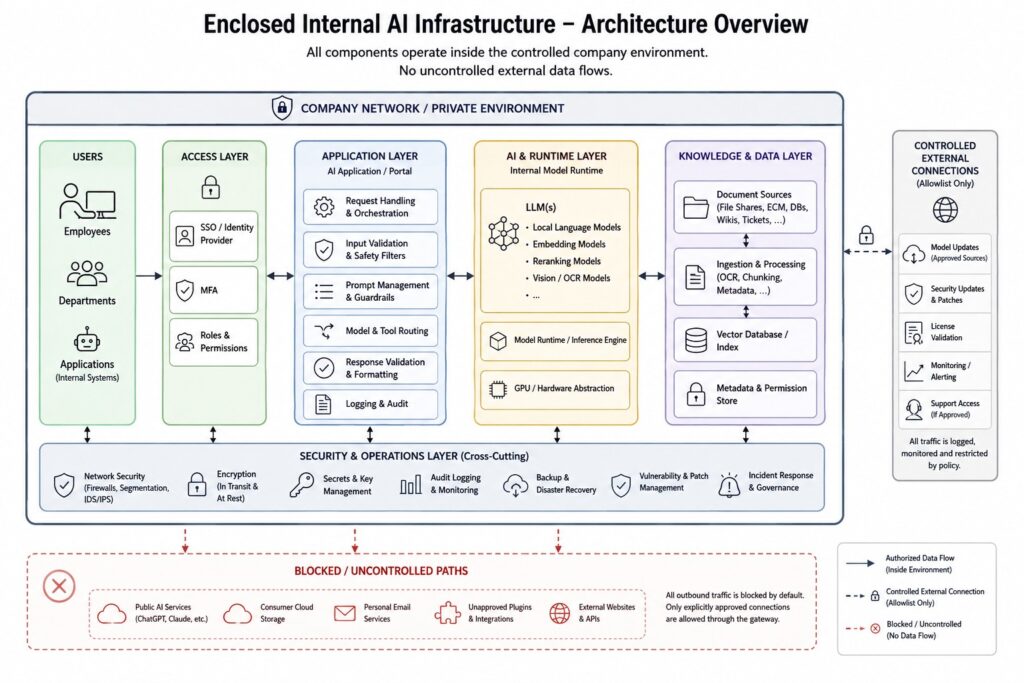
A basic setup may consist of a local AI server, a locally operated language model, an internal user interface and a private document search function. This already allows employees to work with internal documents without sending every prompt to a public AI service.
More demanding environments can add further protection layers, including company identity integration, role-based access, document-level permissions, network segmentation, restricted outbound traffic, audit logging, monitoring, controlled software updates and isolated administration.
The appropriate level depends on the sensitivity of the information, the number of users, the existing IT environment and the company’s operational requirements.
For this reason, “internal AI” should not be understood as a binary condition. A model running on a local server is only the foundation. Additional controls determine how strongly the complete environment is protected against unauthorized access and uncontrolled data flows.
This article describes the full range of architectural layers that may form part of an enclosed AI environment. Not every company needs every component from the beginning. A practical implementation can start with a defined core setup and then be extended with additional security, integration and operational modules.
A useful structure would be:
| Level | Typical scope |
|---|---|
| Core internal AI setup (i.e. our Core Package) | Local model, internal interface, local document processing, basic knowledge retrieval |
| Controlled business integration | Identity integration, user groups, connectors, structured document ingestion |
| Advanced data protection | Document-level permissions, network segmentation, outbound restrictions, audit logging |
| Enterprise resilience | Monitoring, backups, redundancy, update processes, incident response |
| Maximum-isolation setup | Air-gapped operation, controlled update transfer, hardened administration, strict gateway policies |
The Basic Architecture
A practical internal AI environment normally consists of several connected layers.
1. The user interface
Employees need an approved interface through which they can access the internal AI. This may be a secure web application, an integration in an existing company portal, or an AI assistant embedded in a business application.
The interface should authenticate each user through the company’s identity system. Anonymous or shared access makes it difficult to apply permissions, investigate incidents, or understand how the system is being used.
2. The AI application layer
The application layer receives the request, verifies the user, applies security rules, prepares the prompt, selects the appropriate model, and returns the result.
It can also enforce restrictions. For example, it may prevent users from uploading unsupported file types, limit document sizes, remove unnecessary metadata, or block functions that a particular user group is not allowed to use.
This layer is important because users should not communicate directly with the underlying model server.
3. The model runtime
The model runtime loads and operates the language model. It may run an open-weight model on an internal GPU server or use another model deployed within a controlled private environment.
The model itself does not automatically know company information. It initially only has the knowledge contained in its model weights and the information supplied in the current request.
Model selection should therefore be based on the actual use case. A large general-purpose model may provide better language quality, while a smaller model may be sufficient for classification, extraction, document routing, or structured responses.
4. The internal knowledge layer
For many companies, the most useful AI functions depend on internal documents. These can include process descriptions, manuals, policies, product documentation, project files, service records, and knowledge-base articles.
A common method for connecting these sources is retrieval-augmented generation, or RAG. Relevant passages are retrieved from approved internal sources and added to the model’s context before it generates its answer.
This allows the AI to work with current company information without retraining the complete model. However, the retrieval system must respect the original document permissions. An employee should not receive information through the AI that they would not be permitted to open in the source system.
5. The security and operations layer
The complete environment requires supporting services for:
- identity and access management;
- encryption;
- secrets and key management;
- network control;
- logging and monitoring;
- backups;
- vulnerability management;
- model and software updates;
- and incident response.
These components determine whether the installation is merely local or genuinely protected.
How Data Should Move Through the System
A controlled request can follow a clearly defined sequence.
First, the employee signs in through the company identity provider. The AI application verifies the identity and determines the user’s roles and permissions.
The employee then enters a question or uploads an approved document. Before processing begins, the application can check the input for file type, size, malware, sensitive content, and policy violations.
When internal knowledge is required, the retrieval layer searches only sources that the user is authorized to access. Relevant passages are passed to the local model together with the user’s request and the system instructions.
The model generates a response inside the protected environment. The application may then validate, format, filter, or log the result before returning it to the user.
In a fully internal AI architecture, no part of this processing requires an external model API. In a hybrid architecture, selected requests may be routed to an external model, but only through a controlled gateway and according to explicit rules.
The distinction is important: secure hybrid AI is not the same as allowing every application to contact external AI providers independently.
How to Build the Environment
Companies should begin with a limited business use case rather than buying hardware immediately.
Step 1: Define the use case and data boundary
Identify what the AI should do and which information it needs. An internal knowledge assistant, for example, has different infrastructure and permission requirements from an OCR system or a coding assistant.
The company should classify the relevant data and decide which categories must remain internal. This creates the boundary against which the architecture can be evaluated.
Step 2: Choose the deployment model
A fully local deployment offers the strongest direct control over processing and outbound connections. It is particularly suitable where documents are highly confidential or where the company already operates its own infrastructure.
A private cloud deployment can reduce hardware administration but transfers part of the operational responsibility to the cloud environment.
A hybrid system combines internal processing with controlled access to external models. It can provide broader capabilities, but the routing rules and data filtering mechanisms become part of the security-critical architecture.
Step 3: Select the model and infrastructure
The model should be tested against representative company tasks before the final infrastructure is purchased.
Important factors include response quality, supported languages, context length, memory requirements, inference speed, concurrent users, licensing conditions, and compatibility with the chosen runtime.
Infrastructure planning must also consider storage, backup, network capacity, availability, cooling, power consumption, and future expansion. The largest model that can technically be installed is not automatically the best operational choice.
Step 4: Build the protected application layer
The model should be placed behind a managed application or API gateway. This layer handles authentication, authorization, input validation, model selection, usage limits, and logging.
Direct access to model runtimes, vector databases, administrative interfaces, or infrastructure management endpoints should be restricted to the services and administrators that genuinely require it.
This follows a zero-trust principle: access should not be granted merely because a user or system is located inside the company network. Permissions should be evaluated for the individual identity, resource, and request.
Step 5: Connect internal knowledge carefully
Documents should not simply be copied into one large AI database.
The ingestion process should record where each document came from, who owns it, which version is current, and which users are allowed to retrieve it. Deleted or expired documents must also be removed from the AI index.
The same principle applies to embeddings. Although embeddings do not normally contain the original document in plain text, they remain derived from company information and should be protected accordingly.
Step 6: Restrict external communication
Outbound network traffic should follow a deny-by-default approach wherever practical. The AI server should only contact approved destinations required for defined operational purposes.
Updates, model downloads, license checks, monitoring tools, and support connections should be reviewed individually. Where strong isolation is required, updates can be downloaded through a separate controlled process, verified, and transferred into the protected environment.
Administrators should also verify whether installed components collect telemetry or communicate with external repositories by default.
Step 7: Test and operate the complete system
Before rollout, the environment should be tested with realistic users, documents, permissions, and attack scenarios.
Testing should examine whether users can retrieve unauthorized documents, manipulate the system through prompt injection, access administrative functions, trigger unintended external calls, or cause sensitive information to appear in logs.
Security does not end when the system goes live. Models, libraries, operating systems, connectors, and user permissions change over time. The environment therefore needs defined ownership, monitoring, patching, backup, and incident-response procedures. A continuous maintenance is obligatory.
The Most Important Security Controls
No single control makes the environment secure. Protection comes from combining different measures across the complete AI lifecycle, as recommended by established AI and cybersecurity frameworks and summarized in the following overview. [1][2][3]
| Control | Purpose |
|---|---|
| Central authentication | Identifies every user and avoids uncontrolled shared access |
| Role- and document-based permissions | Limits information to authorized users |
| Network segmentation | Separates AI components from unrelated systems |
| Restricted outbound traffic | Prevents unauthorized external data transmission |
| Encryption | Protects stored data and internal communications |
| Secret management | Secures API keys, certificates, and service credentials |
| Audit logging | Makes access, changes, and incidents traceable |
| Input and output validation | Reduces misuse and unsafe downstream processing |
| Controlled update process | Limits software supply-chain and operational risks |
| Monitoring and incident response | Detects abnormal activity and supports containment |
Local AI Is Not Automatically Secure
One of the most common misconceptions is that running a model locally solves almost every security problem.
A local model can still expose information if document permissions are implemented incorrectly. A compromised plugin can transmit data externally. Logs can store complete prompts. An administrator can misconfigure the network. A malicious document can contain instructions designed to manipulate the model. Outdated components can introduce conventional software vulnerabilities.
Current AI security guidance therefore treats prompt injection, sensitive information disclosure, insecure output handling, model supply chains, and excessive system permissions as separate risks. [4][5]
An enclosed AI environment must protect the surrounding application, data sources, identities, infrastructure, and operational processes—not only the model weights.
Fully Local or Controlled Hybrid AI?
A fully local AI environment is appropriate when data control has priority and the required use cases can be handled by internally operated models. It provides a clear infrastructure boundary and avoids dependence on an external inference service.
Its limitations may include higher infrastructure responsibility, hardware costs, restricted model choice, and lower performance on some complex tasks compared with leading external models.
A hybrid architecture can use local models for sensitive work and external models for approved, non-sensitive requests. This can be useful for general research, creative ideation, or tasks requiring capabilities that are not available locally.
However, the external route should be treated as a controlled exception. Requests may need to be classified, filtered, anonymized, or manually approved before transmission. The organization must also understand what information is sent, where it is processed, how long it is retained, and which provider settings apply.
Common Implementation Mistakes
- The first mistake is purchasing an expensive AI server before defining the use case. This can result in infrastructure that is oversized, undersized, or unsuitable for the required model.
- The second is treating the internal network as a trusted zone. Employees, services, and applications should only receive access to the specific AI functions and information they need.
- The third is importing large document collections without preserving their permissions, ownership, and lifecycle information. Also keep in mind that many documents might be outdated and should not pollute the models knowledge base.
- The fourth is concentrating only on incoming prompts while ignoring outgoing connections, telemetry, logs, backups, plugins, and update mechanisms.
- Finally, many prototypes lack an operational concept. A successful production environment needs a responsible owner, support process, update strategy, monitoring, user guidance, and measurable quality criteria.
Frequently Asked Questions
Yes. The model runtime, application, document index, and user interface can operate within an isolated network. Updates and new model versions then require a separate controlled transfer process.
Not necessarily. In a RAG architecture, documents are retrieved when needed and supplied as context. The base model is not automatically retrained with every document or conversation.
Yes. A properly designed system connects retrieval and application permissions to individual identities and existing company roles. The AI should never bypass the permissions of the underlying source systems.
No. The decisive factor is whether the chosen model can be deployed within the approved environment under acceptable technical, contractual, and licensing conditions.
Yes, within a hybrid architecture. External access should pass through a central gateway with defined routing, filtering, authorization, logging, and provider rules.
No. It reduces uncontrolled external data exposure but does not eliminate software vulnerabilities, misuse, incorrect permissions, model errors, prompt injection, or operational failures. These risks require additional controls and continuous management.
Conclusion
An enclosed internal AI infrastructure gives companies a practical way to use generative AI while retaining control over sensitive information.
The decisive factor is not simply where the language model runs. A protected AI environment must control the complete chain: user identity, document permissions, retrieval, model processing, network communication, logging, updates, and ongoing operation.
Companies should begin with one clearly defined use case and a limited data set. Once the architecture, security controls, and operational processes have been validated, the environment can be expanded to additional departments and workflows.
Protected AI supports companies in designing and implementing local and hybrid AI infrastructures that match their security requirements, existing systems, and practical business objectives.
Sources used
[1] NIST AI Risk Management Framework: NIST structures AI risk management around governance, risk mapping, measurement, and management, while its generative-AI profile extends the framework to risks specific to generative systems.
[2] NIST Zero Trust Architecture: Zero trust removes implicit trust based purely on network location and focuses access decisions on users, assets, resources, and granular policies.
[3] NCSC Guidelines for Secure AI System Development: The guidance covers secure design, development, deployment, operation, supply-chain protection, documentation, logging, monitoring, and update management.
[4] NSA AI data-security guidance: The 2025 joint guidance emphasizes trusted infrastructure, data provenance, authenticated revisions, supply-chain risks, and protection throughout the AI lifecycle.
[5] OWASP guidance: OWASP identifies prompt injection, sensitive information disclosure, insecure output handling, supply-chain weaknesses, and related application risks as major concerns for LLM-based systems.
[6] Secure-by-design guidance: CISA recommends incorporating security into system design and making secure configurations available by default rather than adding protection only after deployment.

Leave a Reply